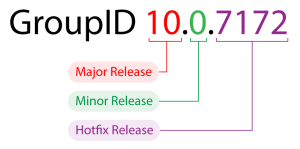
The following diagram displays the support lifecycle phases:

Phases are:
- Committed Support Phase (CS)
- Limited Support Phase (LS)
- End of Support Phase (ES)
Committed Support Phase (CS)
Committed Support begins with the launch of a major release and continues until Limited Support. A product tentatively remains in Committed Support for 24 months.
During this phase, the product is fully supported and maintained, Imanami will provide code-level maintenance through minor releases and hotfix releases, when considered necessary by Imanami to resolve issues with the product. Requests for feature and product enhancements are decided on case-to-case basis and are more typically implemented in the latest release.
Note: Platinum Customers are entitled to add a maximum one-year extension to Committed Support as a paid service.
Limited Support Phase (LS)
Limited Support begins when the Committed Support phase ends and continues for 12 months.
During this phase, Technical Support continues as before until the product reaches its End of Support. The Technical Support does not include issue escalation to the Maintenance Team, product updates, feature enhancements, and documentation additions. Critical defects and OS updates will be addressed on a case-by-case basis and at the sole discretion of Imanami Client Services. If escalation to the Maintenance Team is needed, customers may be required to update or upgrade to a newer version of the product.
Note: Platinum Customers are entitled to add a maximum one-year extension to Limited Support as a paid service
End of Support Phase (ES)
When the Limited Support phase ends, it virtually marks the End of Support date for the major release.
Once a product release reaches its End of Support date, customers may continue to use the product within the terms of their product licensing agreement; however, the available support options will be limited. While there may be historical information in the knowledge base or other online resources, it may not be updated. The customer will be using the product within the terms of the product license as-is.
Summary Table
The following table provides details of the services available in each support lifecycle phase.
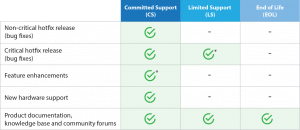
* Case-by-case basis and at the sole discretion of the Imanami Client Services.